
Short answer
A standard YouTube embed transfers about 530 KB before your visitor presses play, and roughly 1.7 MB of that is JavaScript once decompressed and handed to the browser to parse. It does this on page load, whether or not anyone ever watches the video.
The fix is not a player parameter. It is to not create the iframe until someone asks for the video, which is a technique called a facade. Done properly it takes the pre-play cost down to a single small script and one image.
What a standard embed actually costs
Paste an embed on a page and the browser fetches two things immediately: the embed document itself, and base.js, the script that builds YouTube’s player. Neither is small, and neither waits for an interaction.
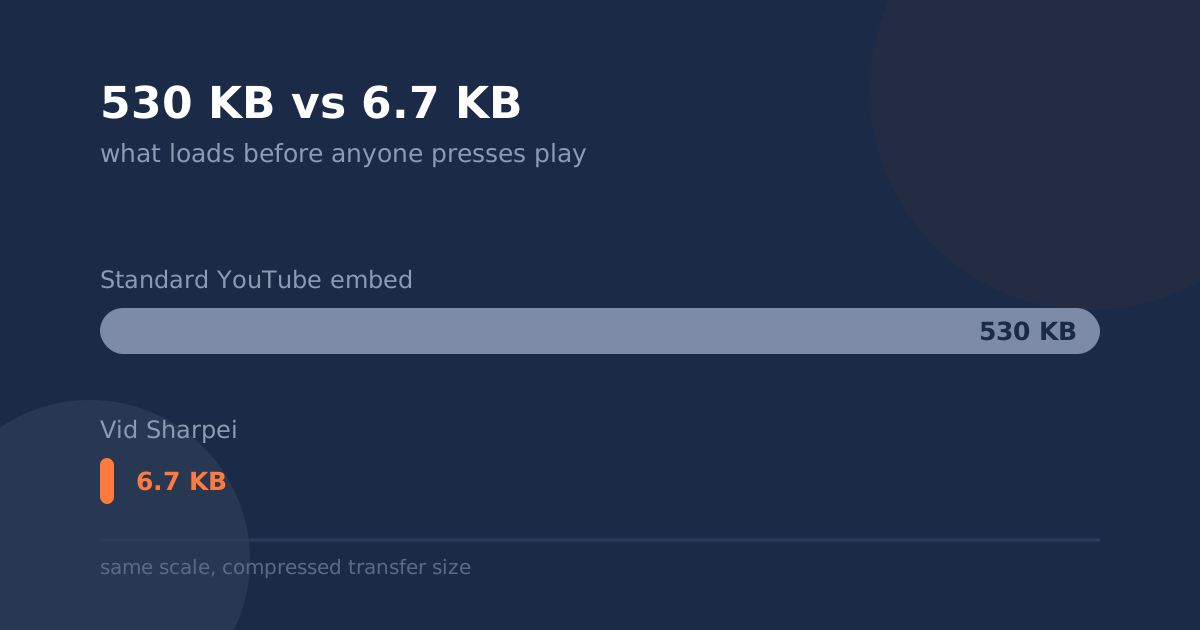
Transferred before the visitor presses play
Compressed bytes over the wire, both bars on the same scale
The embed document plus base.js, its player script
One script. Nothing is requested from YouTube yet
Measured August 16, 2026 with curl. Method and commands are at the end of this post, so you can check the numbers yourself.
That is a ratio of roughly 79 to 1. It is not a tuning difference, it is a difference in what the page is doing at all: one version downloads and boots an entire video application on load, the other draws a picture and waits.
The parse cost is worse than the download
Transfer size gets the attention because it is the number a network tab shows first, but compressed bytes are not the expensive part. The browser has to decompress that JavaScript and then parse and compile it, and that work happens on the main thread, the same thread responsible for responding to taps and clicks.
| On page load, before any click | Compressed | Uncompressed |
|---|---|---|
| Embed document | 52.4 KB | 126.6 KB |
base.js, the player script | 477.6 KB | 1607 KB |
| Standard embed total | 530.0 KB | 1733.6 KB |
| A deferred player, for comparison | 6.7 KB | 18.3 KB |
1.6 MB of JavaScript is a large amount of parsing for a page whose visible contribution is a thumbnail and a play button. On a mid-range phone that work is measured in hundreds of milliseconds, and it lands during the window when someone is deciding whether your page is worth staying on.
Embed a second video on the same page and the document cost repeats. Put a video in a carousel with four slides and you have paid for four players nobody has asked to watch.
Three things that do not fix it
Switching to youtube-nocookie.com. This is a privacy domain, not a performance one. The payload is the same, which is exactly what we measured against. It is still worth using for the reasons in our post on embeds and GDPR, just not for this.
Player parameters. rel, modestbranding, controls and the rest change how the player behaves once it exists. None of them change whether it loads. Most of them do less than people think anyway, which is the subject of why rel=0 doesn’t hide suggested videos.
loading="lazy" on the iframe, on its own. This one is genuinely useful and deserves a fair hearing: it defers iframes that are far below the fold until the visitor scrolls near them. But it does nothing for a video near the top of the page, which is where marketing videos live, and it only delays the cost rather than removing it. If the visitor scrolls, they still pay.
What does fix it: the facade
A facade is a lightweight stand-in for the real player. You render the video’s thumbnail and a play button as ordinary page elements, and you create the actual iframe only when someone clicks. Before the click there is no player, so there is nothing to download, parse or execute.
If you want to build this yourself, the best known implementation is lite-youtube-embed, an open source web component by Paul Irish. It addresses the load-time problem and nothing beyond it.
Where a plain facade stops
The catch is what happens after the click. A facade solves the load, and then hands over to the standard player, which arrives with the appearance and behavior it always had. So you have fixed page weight and changed nothing about what the video looks like once it is playing.
You also own it now. Thumbnail resolutions change, players get new parameters, browsers change autoplay rules, and a component you pasted in two years ago is a component you maintain.
How our player handles it
Vid Sharpei is a facade by default, which is where the 6.7 KB in the chart comes from. On page load the embed renders a cover image and a play button and creates no video iframe at all. The player is created on the visitor’s first interaction, against youtube-nocookie.com.
The difference from a plain facade is what you get after the click: the controls, colors and end-of-video call to action are ours rather than the defaults, so the fast version and the on-brand version are the same build rather than two competing goals.
Two honest caveats. If you switch autoplay on, the player has to be created on load and you give up most of this benefit, which is a real trade and worth making deliberately. And by default the cover image is fetched from YouTube’s image CDN, so one image request does happen on load. Uploading your own cover removes it.
Check the numbers yourself
Everything above came from two commands. The first fetches the embed document and reports what crossed the wire:
curl -s -H 'Accept-Encoding: gzip, deflate, br' \
  -o /dev/null -w '%{size_download}\n' \
  'https://www.youtube-nocookie.com/embed/VIDEO_ID'
The second measures the player script. Its URL is versioned and changes over time, so read the current path out of the embed document rather than copying one from an article:
curl -s 'https://www.youtube-nocookie.com/embed/VIDEO_ID' \
  | grep -o '/s/player/[^"]*base.js'
Then fetch that path the same way as the first command. Drop the Accept-Encoding header to see the uncompressed size instead.
Related reading
Deferred loading is the same mechanism behind the privacy argument, since a request that never happens transmits nothing: does embedding YouTube break GDPR? And if you are implementing this on WordPress, the block to use and the plan restriction to check first are in how to add a clean, on-brand video to WordPress.